<?xml version="1.0" encoding="utf-8"?>
<feed xmlns="http://www.w3.org/2005/Atom">
	<title type="html"><![CDATA[REXYGEN Community Forum / Firing up the html on Windows 8.1 Laptop]]></title>
	<link rel="self" href="https://www.rexygen.com/oldforum/extern.php?action=feed&amp;tid=88&amp;type=atom"/>
	<link href="http://www.rexygen.com/oldforum/viewtopic.php?id=88"/>
	<updated>2016-04-11T07:07:54Z</updated>
	<generator>FluxBB</generator>
	<id>http://www.rexygen.com/oldforum/viewtopic.php?id=88</id>
	<entry>
		<title type="html"><![CDATA[Re: Firing up the html on Windows 8.1 Laptop]]></title>
		<link rel="alternate" href="http://www.rexygen.com/oldforum/viewtopic.php?pid=441#p441"/>
		<content type="html"><![CDATA[<p>Hello sudhir,</p><p>thank you very much for your suggestions! I will forward it to a person who is responsible for HMI.</p><p>Have a nice day, Tomas</p>]]></content>
		<author>
			<name><![CDATA[tomáš čechura]]></name>
			<uri>http://www.rexygen.com/oldforum/profile.php?id=39</uri>
		</author>
		<updated>2016-04-11T07:07:54Z</updated>
		<id>http://www.rexygen.com/oldforum/viewtopic.php?pid=441#p441</id>
	</entry>
	<entry>
		<title type="html"><![CDATA[Re: Firing up the html on Windows 8.1 Laptop]]></title>
		<link rel="alternate" href="http://www.rexygen.com/oldforum/viewtopic.php?pid=432#p432"/>
		<content type="html"><![CDATA[<p>The Cygwin problem is caused by Windows 8.1 based on my Google research. The solution appears to be &quot;use minGW instead Cygwin&quot; for the compile process.</p>]]></content>
		<author>
			<name><![CDATA[sudhir]]></name>
			<uri>http://www.rexygen.com/oldforum/profile.php?id=49</uri>
		</author>
		<updated>2016-04-10T16:11:23Z</updated>
		<id>http://www.rexygen.com/oldforum/viewtopic.php?pid=432#p432</id>
	</entry>
	<entry>
		<title type="html"><![CDATA[Re: Firing up the html on Windows 8.1 Laptop]]></title>
		<link rel="alternate" href="http://www.rexygen.com/oldforum/viewtopic.php?pid=431#p431"/>
		<content type="html"><![CDATA[<p>Thanks. That worked. Just got one error as shown in the following paragraph but rest seems to be working.<br />Appreciate your help.</p><p>C:\Program Files (x86)\REX Controls\REX_2_10_8_5910_x86\EXAMPLES\REX_TUTOR\PIDU&gt;<br />run.bat<br />Downloading example to local rexcore..<br />Starting HMI..</p><p>Starting lighttpd web server ..<br />&#160; &#160; &#160; 1 [main] lighttpd 10000 find_fast_cwd: WARNING: Couldn&#039;t compute FAST_CWD<br />pointer.&#160; Please report this problem to<br />the public mailing list cygwin@cygwin.com<br />Waiting few seconds..</p><p>Starting websocket backend..<br />Waiting few seconds..<br />Deleting C:\ProgramData\REX Controls\REX_2_10_8_5910\HMI<br />Downloading HMI from folder C:\Program Files (x86)\REX Controls\REX_2_10_8_5910_<br />x86\EXAMPLES\REX_TUTOR\PIDU\hmi<br />56 File(s) copied<br />Starting Web browser (<a href="http://127.0.0.1:8008/" rel="nofollow">http://127.0.0.1:8008/</a>)..<br />Done. You should see HMI interface in your web browser now.<br />Press any key to continue . . .</p>]]></content>
		<author>
			<name><![CDATA[sudhir]]></name>
			<uri>http://www.rexygen.com/oldforum/profile.php?id=49</uri>
		</author>
		<updated>2016-04-10T16:00:33Z</updated>
		<id>http://www.rexygen.com/oldforum/viewtopic.php?pid=431#p431</id>
	</entry>
	<entry>
		<title type="html"><![CDATA[Re: Firing up the html on Windows 8.1 Laptop]]></title>
		<link rel="alternate" href="http://www.rexygen.com/oldforum/viewtopic.php?pid=378#p378"/>
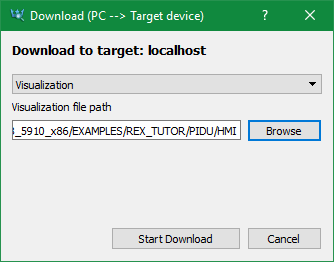
		<content type="html"><![CDATA[<p>Did you try to execute the &quot;run.bat&quot; script located in ./REX_2_10_xxxxxx/EXAMPLES/REX_TUTOR_PIDU/?</p><p>If you didn&#039;t succeed you can run it manually as follows:<br />1. Open &quot;exec.mdl&quot; in RexDraw, Compile and download (F6) (make sure to check &quot;Start local RexCore if necessary&quot; and also uncheck &quot;Save the new configuration permanently&quot; - if you don&#039;t have Administrator rights).<br />2. Open RexView and download HMI to target: Target / PC --&gt; Target device... <br /><span class="postimg"><img src="https://www.rexygen.com/oldforum/img/members/39/download_HMI.png" alt="download_HMI.png" /></span><br />3. Run RexHMI services (shortcut in Start menu Rex Controls folder)<br />4. Open web browser and fill in address 127.0.0.1:8008 and you should see the visualisation.</p><p>Hope it will help you.</p><p>Regards, Tomas</p>]]></content>
		<author>
			<name><![CDATA[tomáš čechura]]></name>
			<uri>http://www.rexygen.com/oldforum/profile.php?id=39</uri>
		</author>
		<updated>2016-04-04T07:59:52Z</updated>
		<id>http://www.rexygen.com/oldforum/viewtopic.php?pid=378#p378</id>
	</entry>
	<entry>
		<title type="html"><![CDATA[Firing up the html on Windows 8.1 Laptop]]></title>
		<link rel="alternate" href="http://www.rexygen.com/oldforum/viewtopic.php?pid=373#p373"/>
		<content type="html"><![CDATA[<p>I was able to run the simple PID loop example. The numbers change so it is running. I could not run the html. I get connection refused for the WS calls.<br />Do I need to install IIS8 or the light webserver? How do I configure those on my laptop so that the WS rex invocation goes through.<br />Thanks.</p>]]></content>
		<author>
			<name><![CDATA[sudhir]]></name>
			<uri>http://www.rexygen.com/oldforum/profile.php?id=49</uri>
		</author>
		<updated>2016-04-03T16:55:01Z</updated>
		<id>http://www.rexygen.com/oldforum/viewtopic.php?pid=373#p373</id>
	</entry>
</feed>