<?xml version="1.0" encoding="utf-8"?>
<feed xmlns="http://www.w3.org/2005/Atom">
	<title type="html"><![CDATA[REXYGEN Community Forum / Unreadable dialog in REXYGEN Studio]]></title>
	<link rel="self" href="https://www.rexygen.com/oldforum/extern.php?action=feed&amp;tid=543&amp;type=atom"/>
	<link href="http://www.rexygen.com/oldforum/viewtopic.php?id=543"/>
	<updated>2018-11-01T07:06:25Z</updated>
	<generator>FluxBB</generator>
	<id>http://www.rexygen.com/oldforum/viewtopic.php?id=543</id>
	<entry>
		<title type="html"><![CDATA[Unreadable dialog in REXYGEN Studio]]></title>
		<link rel="alternate" href="http://www.rexygen.com/oldforum/viewtopic.php?pid=2131#p2131"/>
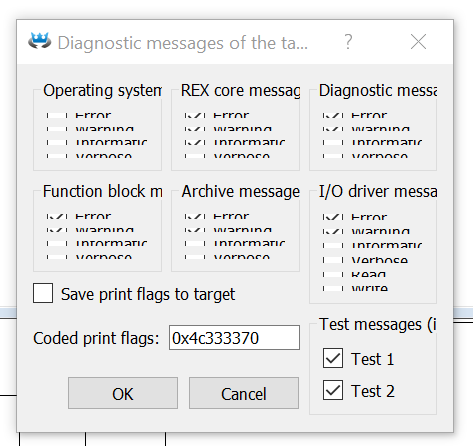
		<content type="html"><![CDATA[<p>Our users have reported unreadable dialogs in REXYGEN Studio. You may have encountered something like this:<br /><span class="postimg"><img src="https://www.rexygen.com/oldforum/img/members/3/unreadable-dialog-rexygen.png" alt="unreadable-dialog-rexygen.png" /></span></p><p>This happens on high-resolution displays (full HD displays on laptops or 4K displays in general).</p><p>The solution is to set environment variable:<br />QT_AUTO_SCREEN_SCALE_FACTOR=1</p><p><a href="https://www.google.com/search?q=setting+environment+variables+in+windows" rel="nofollow">Google will help</a> if you are not sure how to do it.</p><p>This bug will be fixed in the nearest release of REXYGEN.</p><p>Kind regards,<br />Jaroslav</p>]]></content>
		<author>
			<name><![CDATA[jaroslav_sobota]]></name>
			<uri>http://www.rexygen.com/oldforum/profile.php?id=3</uri>
		</author>
		<updated>2018-11-01T07:06:25Z</updated>
		<id>http://www.rexygen.com/oldforum/viewtopic.php?pid=2131#p2131</id>
	</entry>
</feed>
