<?xml version="1.0" encoding="utf-8"?>
<feed xmlns="http://www.w3.org/2005/Atom">
	<title type="html"><![CDATA[REXYGEN Community Forum / Image Changer example request]]></title>
	<link rel="self" href="https://www.rexygen.com/oldforum/extern.php?action=feed&amp;tid=502&amp;type=atom"/>
	<link href="http://www.rexygen.com/oldforum/viewtopic.php?id=502"/>
	<updated>2018-11-04T19:35:23Z</updated>
	<generator>FluxBB</generator>
	<id>http://www.rexygen.com/oldforum/viewtopic.php?id=502</id>
	<entry>
		<title type="html"><![CDATA[Re: Image Changer example request]]></title>
		<link rel="alternate" href="http://www.rexygen.com/oldforum/viewtopic.php?pid=2137#p2137"/>
		<content type="html"><![CDATA[<p>Hi Jaroslav,</p><p>Thank you for the update on this. This certainly will help as there are things that I was not aware of, just figured out by trial and error. Now I&#039;m getting a learning lesson from a professional :-) <br />Thanks a lot, this helps me and I hope others will benefit of this as well.</p><p>Best regards,<br />Peter</p>]]></content>
		<author>
			<name><![CDATA[rexpeter]]></name>
			<uri>http://www.rexygen.com/oldforum/profile.php?id=100</uri>
		</author>
		<updated>2018-11-04T19:35:23Z</updated>
		<id>http://www.rexygen.com/oldforum/viewtopic.php?pid=2137#p2137</id>
	</entry>
	<entry>
		<title type="html"><![CDATA[Re: Image Changer example request]]></title>
		<link rel="alternate" href="http://www.rexygen.com/oldforum/viewtopic.php?pid=2135#p2135"/>
		<content type="html"><![CDATA[<p>Hi Peter,<br />thanks for the example! Though I had to modify it a bit and here is the <a href="https://www.rexcontrols.cz/forum/img/members/3/ImageChanger-20181102-1112.zip" rel="nofollow">updated example project</a>.</p><p>Let me explain the modifications:</p><ol class="decimal"><li><p>The PNG pictures should be placed in the hmisrc/images subfolder inside the project folder. That way all the pictures will be included in the resulting HMI. See the <a href="https://www.rexygen.com/doc/ENGLISH/MANUALS/BRef/HMI.html" rel="nofollow">HMI block documentation</a> for details.</p></li><li><p>The HMI:GenerateRexHMI parameter should be set to on. That way the SVG source file is automatically processed during project compilation, giving you the most up-to-date HMI without any effort.</p></li><li><p>It is recommended not to remove the block type from its name, so I changed the name of the block in your task to CNI_ImageChanger.</p></li><li><p>I have updated the connection strings in the SVG file, so that it correlates with step 3.</p></li><li><p>I have updated the description in the SVG file (information about path)</p></li></ol><p>The resulting HMI looks like this:<br /><span class="postimg"><img src="https://www.rexcontrols.cz/forum/img/members/3/ImageChangerHMI.png" alt="ImageChangerHMI.png" /></span></p><p>I also noticed there is some bug in the Switch element, which prevents it from animating. Normally the switch is supposed to rotate as you click it.</p><p>Thanks again for your post!</p><p>Kind regards,<br />Jaroslav</p>]]></content>
		<author>
			<name><![CDATA[jaroslav_sobota]]></name>
			<uri>http://www.rexygen.com/oldforum/profile.php?id=3</uri>
		</author>
		<updated>2018-11-02T11:32:38Z</updated>
		<id>http://www.rexygen.com/oldforum/viewtopic.php?pid=2135#p2135</id>
	</entry>
	<entry>
		<title type="html"><![CDATA[Re: Image Changer example request]]></title>
		<link rel="alternate" href="http://www.rexygen.com/oldforum/viewtopic.php?pid=2134#p2134"/>
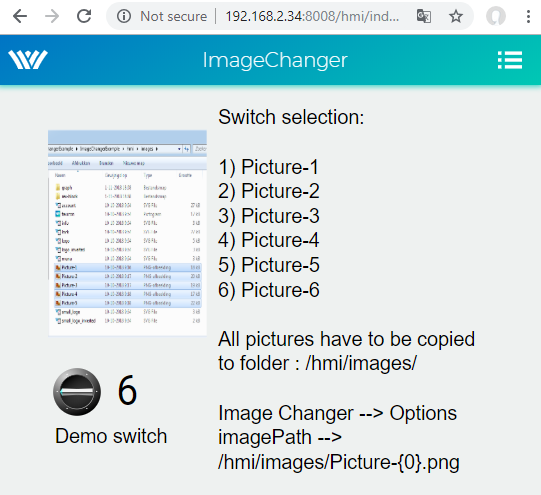
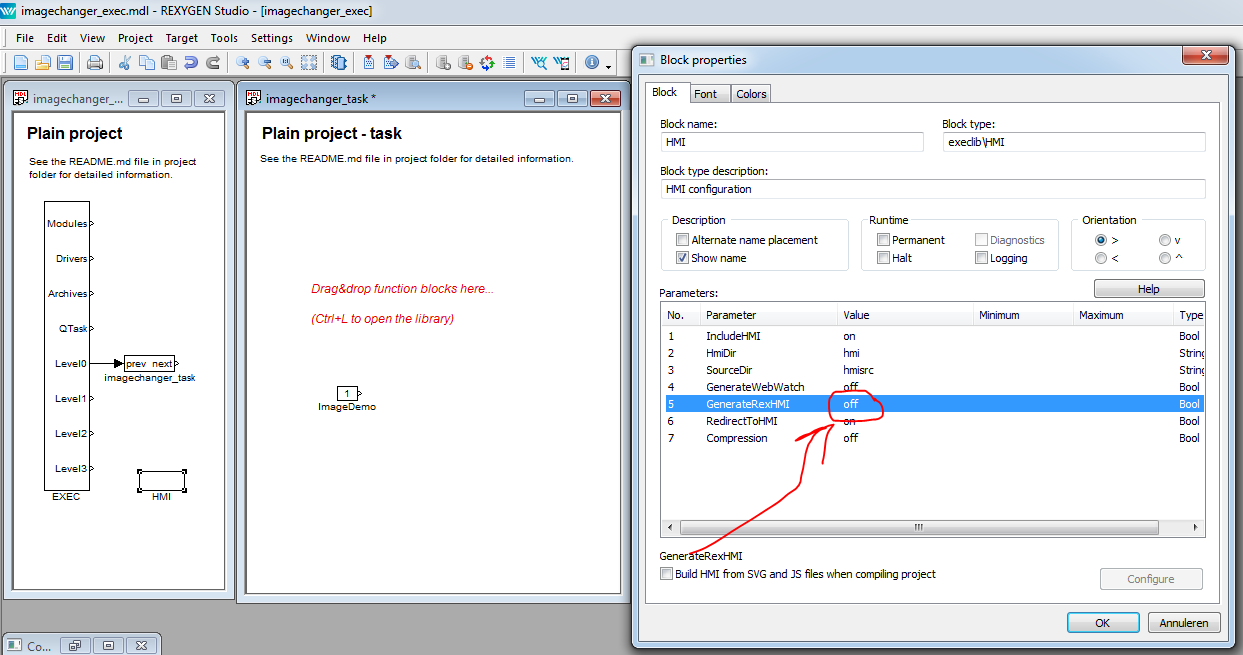
		<content type="html"><![CDATA[<p>Hi Tomas,</p><p>Thanks for your assistance.<br />It is clear now to me and for the convenience of others <span class="bbs"><a href="https://www.rexygen.com/oldforum/img/members/100/ImageChanger_20181101-1815.zip" rel="nofollow">I have posted an example project</a></span> <em>(edited by admin, see next post for explanation)</em>.</p><p><span class="postimg"><img src="https://www.rexygen.com/oldforum/img/members/100/screenshot_Imagechanger.png" alt="screenshot_Imagechanger.png" /></span></p><p>This is how the HMI looks like with factually 5 &quot;images&quot; that will change upon pressing the &quot;demo button&quot;.<br />The images show the settings of the component.<br />The last image is showing where and HOW the files are stored in the HMI folder.</p><p><em>Edited by admin, see next post for explanation:</em> <br /><span class="bbs">NOTE: please make sure you have switched OFF the GenerateRexHMI parameter in the HMI block! <br /><span class="postimg"><img src="https://www.rexygen.com/oldforum/img/members/100/HMI-block-properties.png" alt="HMI-block-properties.png" /></span><br />If you have that one ON, the HMI folder will be overwritten and all the images that you want to show will be gone!</span></p><p>Regards,<br />Peter</p>]]></content>
		<author>
			<name><![CDATA[rexpeter]]></name>
			<uri>http://www.rexygen.com/oldforum/profile.php?id=100</uri>
		</author>
		<updated>2018-11-01T18:22:07Z</updated>
		<id>http://www.rexygen.com/oldforum/viewtopic.php?pid=2134#p2134</id>
	</entry>
	<entry>
		<title type="html"><![CDATA[Re: Image Changer example request]]></title>
		<link rel="alternate" href="http://www.rexygen.com/oldforum/viewtopic.php?pid=2064#p2064"/>
		<content type="html"><![CDATA[<p>Thanks a lot Tomas,<br />I will have a look at it and give it a trial.</p><p>Best regards,<br />Peter</p>]]></content>
		<author>
			<name><![CDATA[rexpeter]]></name>
			<uri>http://www.rexygen.com/oldforum/profile.php?id=100</uri>
		</author>
		<updated>2018-09-24T21:23:52Z</updated>
		<id>http://www.rexygen.com/oldforum/viewtopic.php?pid=2064#p2064</id>
	</entry>
	<entry>
		<title type="html"><![CDATA[Re: Image Changer example request]]></title>
		<link rel="alternate" href="http://www.rexygen.com/oldforum/viewtopic.php?pid=2063#p2063"/>
		<content type="html"><![CDATA[<p>Hi Peter,</p><p>thank you for your question. Image Changer could be used to achieve described behaviour however it is also possible to use just &quot;opacity&quot; animation (ON image shown/ OFF hidden and vice versa). For more complicated cases I would go for the image changer.<br />The documentation can be found here: <a href="https://www.rexygen.com/doc/PDF/ENGLISH/RexHMI_ENG.pdf#page=22" rel="nofollow">https://www.rexygen.com/doc/PDF/ENGLISH … df#page=22</a></p><p>Please, be aware that there are documentation generator accidentally discarded brackets &quot;{}&quot; in &quot;imagePath&quot; parameter. The &quot;imagePath&quot; parameter in case of using &quot;appendKey&quot; option should look like: /hmi/images/img-{0}.png<br />The substring &quot;{0}&quot; in the file name will be replaced with any current read value (number, string, ...).)</p><p>I also recommend you to have a look at example &quot;0301 - 08 HMI Animation DEMO&quot; which is part of installation. It will give you an idea how to use various animations in REXYGEN HMI Designer.</p><p>Hope it will help you. If you run into any troubles, let me know.</p><p>Cheers, Tomas</p>]]></content>
		<author>
			<name><![CDATA[tomáš čechura]]></name>
			<uri>http://www.rexygen.com/oldforum/profile.php?id=39</uri>
		</author>
		<updated>2018-09-24T20:24:24Z</updated>
		<id>http://www.rexygen.com/oldforum/viewtopic.php?pid=2063#p2063</id>
	</entry>
	<entry>
		<title type="html"><![CDATA[Image Changer example request]]></title>
		<link rel="alternate" href="http://www.rexygen.com/oldforum/viewtopic.php?pid=2055#p2055"/>
		<content type="html"><![CDATA[<p>Hi,</p><p>I&#039;m intending to use some animations of a simply drawing presenting for instance a bulb that is either ON or OFF indicated by a different color.<br />How to implement that?<br />I assume the Image Changer would be the tool for that, but I don&#039;t understand how to use that one.<br />If there is anything written or used as example somewhere, that would be great.</p><p>Thanks,<br />Peter</p>]]></content>
		<author>
			<name><![CDATA[rexpeter]]></name>
			<uri>http://www.rexygen.com/oldforum/profile.php?id=100</uri>
		</author>
		<updated>2018-09-21T14:18:51Z</updated>
		<id>http://www.rexygen.com/oldforum/viewtopic.php?pid=2055#p2055</id>
	</entry>
</feed>