<?xml version="1.0" encoding="utf-8"?>
<feed xmlns="http://www.w3.org/2005/Atom">
	<title type="html"><![CDATA[REXYGEN Community Forum / REX 2.50.5.8614 RexHMIDesigner (script issues)]]></title>
	<link rel="self" href="https://www.rexygen.com/oldforum/extern.php?action=feed&amp;tid=399&amp;type=atom"/>
	<link href="http://www.rexygen.com/oldforum/viewtopic.php?id=399"/>
	<updated>2017-10-25T13:22:03Z</updated>
	<generator>FluxBB</generator>
	<id>http://www.rexygen.com/oldforum/viewtopic.php?id=399</id>
	<entry>
		<title type="html"><![CDATA[Re: REX 2.50.5.8614 RexHMIDesigner (script issues)]]></title>
		<link rel="alternate" href="http://www.rexygen.com/oldforum/viewtopic.php?pid=1785#p1785"/>
		<content type="html"><![CDATA[<p>Glad I could help. Thanks for the update. </p><p>Kind regards,<br />Jaroslav</p>]]></content>
		<author>
			<name><![CDATA[jaroslav_sobota]]></name>
			<uri>http://www.rexygen.com/oldforum/profile.php?id=3</uri>
		</author>
		<updated>2017-10-25T13:22:03Z</updated>
		<id>http://www.rexygen.com/oldforum/viewtopic.php?pid=1785#p1785</id>
	</entry>
	<entry>
		<title type="html"><![CDATA[Re: REX 2.50.5.8614 RexHMIDesigner (script issues)]]></title>
		<link rel="alternate" href="http://www.rexygen.com/oldforum/viewtopic.php?pid=1781#p1781"/>
		<content type="html"><![CDATA[<p>Jaroslav,</p><p>As always this did the exact trick. After posting I actually tried on a fresh copy of Windows 10 bare metal machine and I had the same results. </p><p>I have confirmed on Windows 10 Creators update and Windows Server 2016 that the missing DLL file has corrected the issue with RexHMI Designer and Rex Draw for compiling.</p><p>Thanks,</p>]]></content>
		<author>
			<name><![CDATA[gizmo]]></name>
			<uri>http://www.rexygen.com/oldforum/profile.php?id=129</uri>
		</author>
		<updated>2017-10-24T22:58:29Z</updated>
		<id>http://www.rexygen.com/oldforum/viewtopic.php?pid=1781#p1781</id>
	</entry>
	<entry>
		<title type="html"><![CDATA[Re: REX 2.50.5.8614 RexHMIDesigner (script issues)]]></title>
		<link rel="alternate" href="http://www.rexygen.com/oldforum/viewtopic.php?pid=1779#p1779"/>
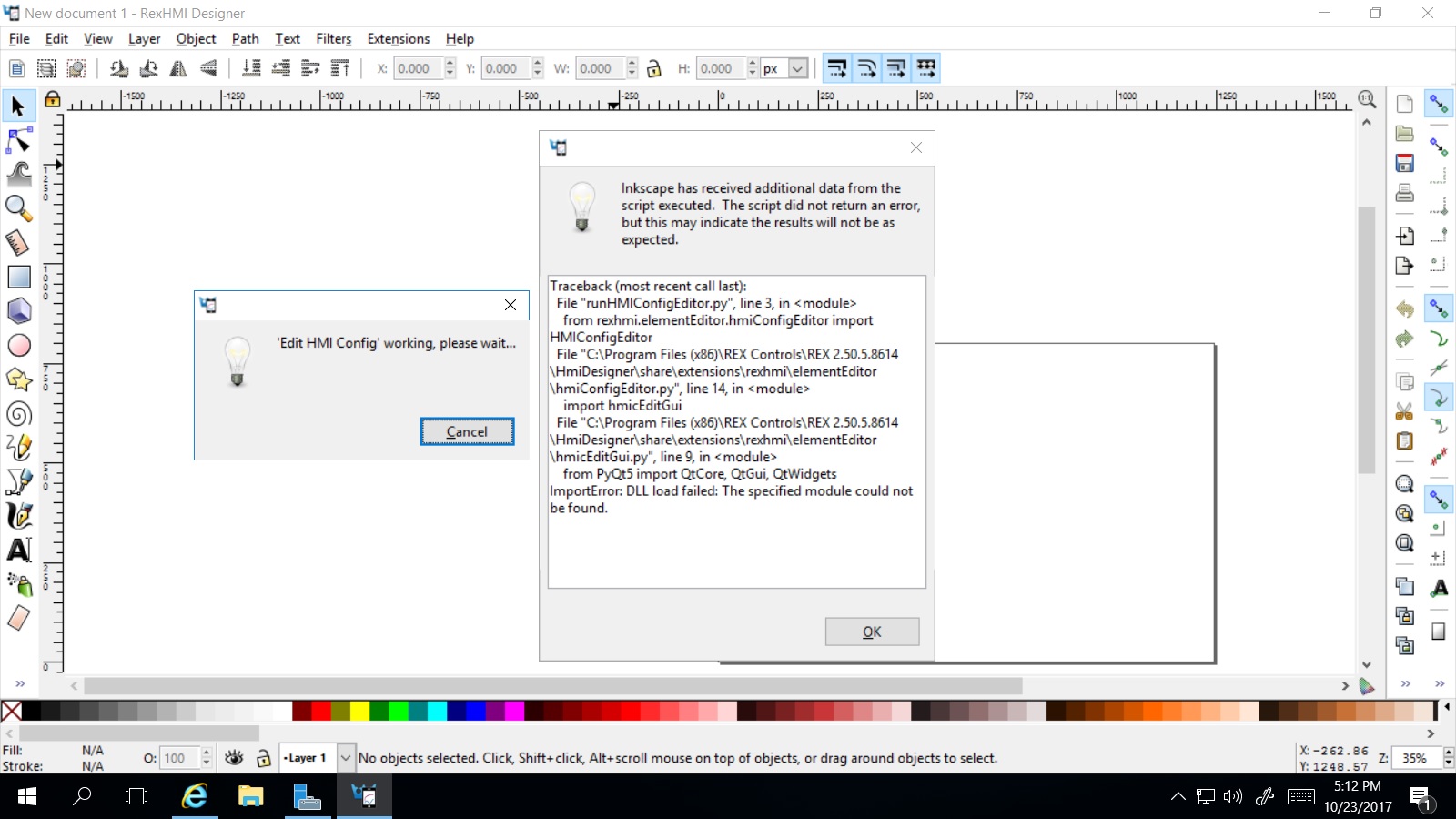
		<content type="html"><![CDATA[<p>Dear Gizmo,<br />I&#039;m sorry to hear about your troubles. There is one Microsoft DLL file missing in the installation package. You can <a href="https://www.rexcontrols.com/media/2.50.5/msvcr100.dll" rel="nofollow">download it</a> and then copy to the installation folder (by default C:\Program Files (x86)\REX Controls\REX 2.50.5.8614\Bin).</p><p>This should solve the problem, please let me know.</p><p>With kind regards,<br />Jaroslav</p>]]></content>
		<author>
			<name><![CDATA[jaroslav_sobota]]></name>
			<uri>http://www.rexygen.com/oldforum/profile.php?id=3</uri>
		</author>
		<updated>2017-10-24T07:53:13Z</updated>
		<id>http://www.rexygen.com/oldforum/viewtopic.php?pid=1779#p1779</id>
	</entry>
	<entry>
		<title type="html"><![CDATA[REX 2.50.5.8614 RexHMIDesigner (script issues)]]></title>
		<link rel="alternate" href="http://www.rexygen.com/oldforum/viewtopic.php?pid=1778#p1778"/>
		<content type="html"><![CDATA[<p>I have installed REX2.50.5.8614 on Windows Server 2016 and I am not able to work with RexHMI at all. I keep getting the same issues no mater what I try.</p><p>Known issues with Windows 2016?<br />Am I missing an external program that is needed?</p><p>Thanks,</p><br /><p><span class="postimg"><img src="https://www.rexygen.com/oldforum/img/members/129/RexHMI_SS1.jpg" alt="RexHMI_SS1.jpg" /></span></p>]]></content>
		<author>
			<name><![CDATA[gizmo]]></name>
			<uri>http://www.rexygen.com/oldforum/profile.php?id=129</uri>
		</author>
		<updated>2017-10-23T21:17:32Z</updated>
		<id>http://www.rexygen.com/oldforum/viewtopic.php?pid=1778#p1778</id>
	</entry>
</feed>