<?xml version="1.0" encoding="utf-8"?>
<feed xmlns="http://www.w3.org/2005/Atom">
	<title type="html"><![CDATA[REXYGEN Community Forum / changing color of HMI Input object?]]></title>
	<link rel="self" href="https://www.rexygen.com/oldforum/extern.php?action=feed&amp;tid=39&amp;type=atom"/>
	<link href="http://www.rexygen.com/oldforum/viewtopic.php?id=39"/>
	<updated>2017-03-16T02:40:13Z</updated>
	<generator>FluxBB</generator>
	<id>http://www.rexygen.com/oldforum/viewtopic.php?id=39</id>
	<entry>
		<title type="html"><![CDATA[Re: changing color of HMI Input object?]]></title>
		<link rel="alternate" href="http://www.rexygen.com/oldforum/viewtopic.php?pid=1556#p1556"/>
		<content type="html"><![CDATA[<p>Thank you, it works</p>]]></content>
		<author>
			<name><![CDATA[geocipo]]></name>
			<uri>http://www.rexygen.com/oldforum/profile.php?id=25</uri>
		</author>
		<updated>2017-03-16T02:40:13Z</updated>
		<id>http://www.rexygen.com/oldforum/viewtopic.php?pid=1556#p1556</id>
	</entry>
	<entry>
		<title type="html"><![CDATA[Re: changing color of HMI Input object?]]></title>
		<link rel="alternate" href="http://www.rexygen.com/oldforum/viewtopic.php?pid=1552#p1552"/>
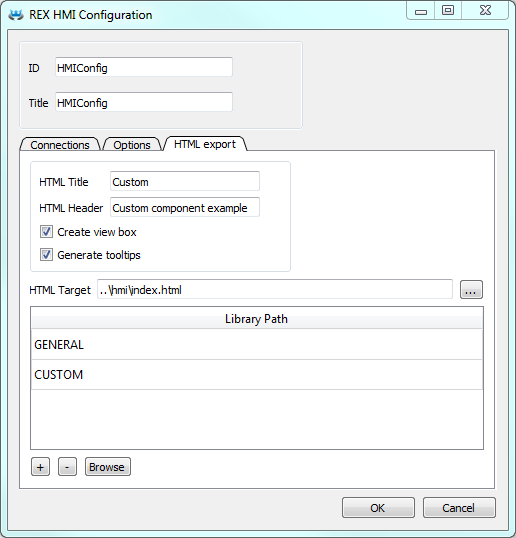
		<content type="html"><![CDATA[<p>Hello geocipo,<br />all the HTML components like Button, Input, Simple Logger, etc. from RexHMI Designer (version &gt; 2.50) are placed inside the HTML DIV element with automatically generated ID using ID of the component and appending <em>-div</em>. If you want to change the styles you have to add you custom css file, you use the RexHMI Designer following these steps</p><ol class="decimal"><li><p>Create CUSTOM/CSS folder in <em>hmisrc</em> directory</p></li><li><p>Create <em>custom.css</em> file</p></li><li><p>In RexHMI Designer open HMI Config extension (CTRL+E)</p></li><li><p>In HTML Export tab just add two libraries, <strong>GENERAL</strong> and <strong>CUSTOM</strong><br /><span class="postimg"><img src="https://www.rexygen.com/oldforum/img/members/5/HMIConfig-custom-component.png" alt="HMIConfig-custom-component.png" /></span></p></li></ol><p>When the webpage is generated from the *.hmi.svg file the <em> Library Paths</em> are evaluated. When the relative path to the folder is found then it copy all the files from <em>js</em> and <em>css</em> sub-directories and add all the files to the main webpage as a resources. This is a way how you can add your custom.css file to the project. If the directory is not found in relative path it tries to search in default libraries that is why the GENERAL library can be used like that.</p><p>You can find simple example of custom component with JS and CSS files here <a href="https://www.rexygen.com/oldforum/img/members/5/Custom_HMI_component.zip" rel="nofollow">Custom_HMI_component.zip</a></p><p>Finally the style for button can be changed following way</p><div class="codebox"><pre><code>#Button-div button{
 /* Your custom style */
 color: yellow;
}</code></pre></div>]]></content>
		<author>
			<name><![CDATA[osevera]]></name>
			<uri>http://www.rexygen.com/oldforum/profile.php?id=5</uri>
		</author>
		<updated>2017-03-14T14:51:38Z</updated>
		<id>http://www.rexygen.com/oldforum/viewtopic.php?pid=1552#p1552</id>
	</entry>
	<entry>
		<title type="html"><![CDATA[Re: changing color of HMI Input object?]]></title>
		<link rel="alternate" href="http://www.rexygen.com/oldforum/viewtopic.php?pid=1545#p1545"/>
		<content type="html"><![CDATA[<p>Hi, If I want to change the css button by button how should i do? Which css tag to use? Because .ui-button transforms the css of all buttons. <br />Thank you in advance.</p>]]></content>
		<author>
			<name><![CDATA[geocipo]]></name>
			<uri>http://www.rexygen.com/oldforum/profile.php?id=25</uri>
		</author>
		<updated>2017-03-13T19:12:33Z</updated>
		<id>http://www.rexygen.com/oldforum/viewtopic.php?pid=1545#p1545</id>
	</entry>
	<entry>
		<title type="html"><![CDATA[Re: changing color of HMI Input object?]]></title>
		<link rel="alternate" href="http://www.rexygen.com/oldforum/viewtopic.php?pid=181#p181"/>
		<content type="html"><![CDATA[<p>Thanks for the tip!</p>]]></content>
		<author>
			<name><![CDATA[jaroslav_sobota]]></name>
			<uri>http://www.rexygen.com/oldforum/profile.php?id=3</uri>
		</author>
		<updated>2015-12-28T01:17:26Z</updated>
		<id>http://www.rexygen.com/oldforum/viewtopic.php?pid=181#p181</id>
	</entry>
	<entry>
		<title type="html"><![CDATA[Re: changing color of HMI Input object?]]></title>
		<link rel="alternate" href="http://www.rexygen.com/oldforum/viewtopic.php?pid=178#p178"/>
		<content type="html"><![CDATA[<p>Maybe a tip for some of us who want to change the appearance of the buttons object in the HMI :</p><p>On <a href="http://www.bestcssbuttongenerator.com/" rel="nofollow">bestcssbuttongenerator</a> you can generate a button and then copy the CSS to your file myStyles.css. Then you just have to change &#039;mybutton&#039; into &#039;ui-button&#039;&#160; (3 times).</p><p>For example....</p><div class="codebox"><pre class="vscroll"><code>.ui-button{
	-moz-box-shadow: 0px 1px 0px 0px #fff6af;
	-webkit-box-shadow: 0px 1px 0px 0px #fff6af;
	box-shadow: 0px 1px 0px 0px #fff6af;
	background:-webkit-gradient(linear, left top, left bottom, color-stop(0.05, #ffec64), color-stop(1, #ffab23));
	background:-moz-linear-gradient(top, #ffec64 5%, #ffab23 100%);
	background:-webkit-linear-gradient(top, #ffec64 5%, #ffab23 100%);
	background:-o-linear-gradient(top, #ffec64 5%, #ffab23 100%);
	background:-ms-linear-gradient(top, #ffec64 5%, #ffab23 100%);
	background:linear-gradient(to bottom, #ffec64 5%, #ffab23 100%);
	filter:progid:DXImageTransform.Microsoft.gradient(startColorstr=&#039;#ffec64&#039;, endColorstr=&#039;#ffab23&#039;,GradientType=0);
	background-color:#ffec64;
	-moz-border-radius:6px;
	-webkit-border-radius:6px;
	border-radius:6px;
	border:1px solid #ffaa22;
	display:inline-block;
	cursor:pointer;
	color:#333333;
	font-family:Arial;
	font-size:15px;
	font-weight:bold;
	padding:6px 24px;
	text-decoration:none;
	text-shadow:0px 1px 0px #ffee66;
}
.ui-button:hover {
	background:-webkit-gradient(linear, left top, left bottom, color-stop(0.05, #ffab23), color-stop(1, #ffec64));
	background:-moz-linear-gradient(top, #ffab23 5%, #ffec64 100%);
	background:-webkit-linear-gradient(top, #ffab23 5%, #ffec64 100%);
	background:-o-linear-gradient(top, #ffab23 5%, #ffec64 100%);
	background:-ms-linear-gradient(top, #ffab23 5%, #ffec64 100%);
	background:linear-gradient(to bottom, #ffab23 5%, #ffec64 100%);
	filter:progid:DXImageTransform.Microsoft.gradient(startColorstr=&#039;#ffab23&#039;, endColorstr=&#039;#ffec64&#039;,GradientType=0);
	background-color:#ffab23;
}
.ui-button:active {
	position:relative;
	top:1px;
}</code></pre></div>]]></content>
		<author>
			<name><![CDATA[scoobsalamander]]></name>
			<uri>http://www.rexygen.com/oldforum/profile.php?id=6</uri>
		</author>
		<updated>2015-12-24T19:27:41Z</updated>
		<id>http://www.rexygen.com/oldforum/viewtopic.php?pid=178#p178</id>
	</entry>
	<entry>
		<title type="html"><![CDATA[Re: changing color of HMI Input object?]]></title>
		<link rel="alternate" href="http://www.rexygen.com/oldforum/viewtopic.php?pid=172#p172"/>
		<content type="html"><![CDATA[<p>For details on Cascading Style Sheets (CSS) see e.g. <a href="http://www.w3.org/community/webed/wiki/CSS/Training" rel="nofollow">http://www.w3.org/community/webed/wiki/CSS/Training</a> and<br /><a href="http://www.w3schools.com/css/" rel="nofollow">http://www.w3schools.com/css/</a></p><p>Each CSS rule has its priority, see e.g.<br /><a href="https://developer.tizen.org/dev-guide/web/2.3.0/org.tizen.mobile.web.appprogramming/html/guide/w3c_guide/dom_guide/html_priorities_css.htm" rel="nofollow">https://developer.tizen.org/dev-guide/w … es_css.htm</a></p><p>You are not overwriting the original CSS files - overlaying is a word which fits better I think. You create a cascade of styles and this is where the name comes from.</p>]]></content>
		<author>
			<name><![CDATA[skardar]]></name>
			<uri>http://www.rexygen.com/oldforum/profile.php?id=20</uri>
		</author>
		<updated>2015-12-22T08:21:02Z</updated>
		<id>http://www.rexygen.com/oldforum/viewtopic.php?pid=172#p172</id>
	</entry>
	<entry>
		<title type="html"><![CDATA[Re: changing color of HMI Input object?]]></title>
		<link rel="alternate" href="http://www.rexygen.com/oldforum/viewtopic.php?pid=171#p171"/>
		<content type="html"><![CDATA[<p>Thanks a lot.... I even managed to change the color of the header and the margins of the &#039;content&#039;...<br />Very useful as I wanted to have an HMI which is more &#039;night vision&#039; friendly....</p><p>But how does it work? Does my own css file overwrites all the existing css files?</p>]]></content>
		<author>
			<name><![CDATA[scoobsalamander]]></name>
			<uri>http://www.rexygen.com/oldforum/profile.php?id=6</uri>
		</author>
		<updated>2015-12-21T22:38:58Z</updated>
		<id>http://www.rexygen.com/oldforum/viewtopic.php?pid=171#p171</id>
	</entry>
	<entry>
		<title type="html"><![CDATA[Re: changing color of HMI Input object?]]></title>
		<link rel="alternate" href="http://www.rexygen.com/oldforum/viewtopic.php?pid=170#p170"/>
		<content type="html"><![CDATA[<p>You can use CSS styles to override the default look of the input elements. Just add a file myStyles.css into<br />C:\ProgramData\REX Controls\RexHMI\libs\MyCSS\css<br />and put the following in:</p><div class="codebox"><pre><code>.ui-state-default{
  background: green;
}

#ColorInput-div{
  background: #CCCC22;
}</code></pre></div><p>This will change background of all input boxes to green and the background of the Input box with ID=ColorInput to yellow. You have to export the HTML files after you add this file.</p><p>Use similar approach to change opacity and border color, e.g.</p><div class="codebox"><pre><code>#ColorInput-div{
  background: #CCCC22;
  opacity: 1.0;
  border: solid 3px rgba(255, 0, 0, 0.8);
}</code></pre></div>]]></content>
		<author>
			<name><![CDATA[jaroslav_sobota]]></name>
			<uri>http://www.rexygen.com/oldforum/profile.php?id=3</uri>
		</author>
		<updated>2015-12-21T15:45:19Z</updated>
		<id>http://www.rexygen.com/oldforum/viewtopic.php?pid=170#p170</id>
	</entry>
	<entry>
		<title type="html"><![CDATA[Re: changing color of HMI Input object?]]></title>
		<link rel="alternate" href="http://www.rexygen.com/oldforum/viewtopic.php?pid=167#p167"/>
		<content type="html"><![CDATA[<p>...it seems that it is coded in the file&#160; jquery-ui-1.10.2.custom.css&#160; and it uses the image</p><p>\css\metro-theme\images\ui-bg_flat_100_f0f0f0_40x100.png. </p><p>I could change the png file but that&#039;s not how it should be done I guess.</p><p>Would it be possible to create a new input.svg with some extra options :</p><p>- background color + alpha channel<br />- border color + alpha channel<br />- text color</p><br /><p>...please some advise</p>]]></content>
		<author>
			<name><![CDATA[scoobsalamander]]></name>
			<uri>http://www.rexygen.com/oldforum/profile.php?id=6</uri>
		</author>
		<updated>2015-12-20T19:44:39Z</updated>
		<id>http://www.rexygen.com/oldforum/viewtopic.php?pid=167#p167</id>
	</entry>
	<entry>
		<title type="html"><![CDATA[changing color of HMI Input object?]]></title>
		<link rel="alternate" href="http://www.rexygen.com/oldforum/viewtopic.php?pid=166#p166"/>
		<content type="html"><![CDATA[<p>How do you change the color of the background and the text of an Input field (HMI Inkscape)?</p>]]></content>
		<author>
			<name><![CDATA[scoobsalamander]]></name>
			<uri>http://www.rexygen.com/oldforum/profile.php?id=6</uri>
		</author>
		<updated>2015-12-18T21:27:54Z</updated>
		<id>http://www.rexygen.com/oldforum/viewtopic.php?pid=166#p166</id>
	</entry>
</feed>