<?xml version="1.0" encoding="utf-8"?>
<feed xmlns="http://www.w3.org/2005/Atom">
	<title type="html"><![CDATA[REXYGEN Community Forum / Creating a button in Inkscape]]></title>
	<link rel="self" href="https://www.rexygen.com/oldforum/extern.php?action=feed&amp;tid=11&amp;type=atom"/>
	<link href="http://www.rexygen.com/oldforum/viewtopic.php?id=11"/>
	<updated>2017-02-28T13:37:43Z</updated>
	<generator>FluxBB</generator>
	<id>http://www.rexygen.com/oldforum/viewtopic.php?id=11</id>
	<entry>
		<title type="html"><![CDATA[Re: Creating a button in Inkscape]]></title>
		<link rel="alternate" href="http://www.rexygen.com/oldforum/viewtopic.php?pid=1509#p1509"/>
		<content type="html"><![CDATA[<p>Yes that is correct for the new version of the components, REX version &gt; 2.50.1</p>]]></content>
		<author>
			<name><![CDATA[osevera]]></name>
			<uri>http://www.rexygen.com/oldforum/profile.php?id=5</uri>
		</author>
		<updated>2017-02-28T13:37:43Z</updated>
		<id>http://www.rexygen.com/oldforum/viewtopic.php?pid=1509#p1509</id>
	</entry>
	<entry>
		<title type="html"><![CDATA[Re: Creating a button in Inkscape]]></title>
		<link rel="alternate" href="http://www.rexygen.com/oldforum/viewtopic.php?pid=1508#p1508"/>
		<content type="html"><![CDATA[<p>Hi, this does not work for me:<br />var obj = Object.create(REX.UI.SVG.Component(svgElem, args));<br />Instead, I had to use this:<br />var obj = new REX.UI.SVG.Component(svgElem,args);</p>]]></content>
		<author>
			<name><![CDATA[stepan.ozana]]></name>
			<uri>http://www.rexygen.com/oldforum/profile.php?id=110</uri>
		</author>
		<updated>2017-02-28T08:51:13Z</updated>
		<id>http://www.rexygen.com/oldforum/viewtopic.php?pid=1508#p1508</id>
	</entry>
	<entry>
		<title type="html"><![CDATA[Re: Creating a button in Inkscape]]></title>
		<link rel="alternate" href="http://www.rexygen.com/oldforum/viewtopic.php?pid=180#p180"/>
		<content type="html"><![CDATA[<p>Here is the second part of the tutorial. We&#039;ll create a simple button to control a Boolean signal and display its status. The best part is that you can create a button which is completely yours so it can match your style. </p><ol class="decimal"><li><p>Open a blank document in Inkscape (without the &quot;RexHMI Config&quot; object).</p></li><li><p>Create an SVG illustration in Inkscape (a rectangle and a text, the text overlays the rectangle and stands for the label of the button).</p></li><li><p>Group the whole illustration (Ctrl+G) and save the file, see <a href="https://www.rexygen.com/oldforum/img/members/3/MyButton_src.svg" rel="nofollow">MyButton_src.svg</a>.</p></li><li><p>Extensions-&gt;RexHMI-&gt;Group Animation, tick Rotate and click OK.</p></li><li><p>Extensions-&gt;RexHMI-&gt;Group Animation, untick Rotate and click OK (by this you just wrapped the object and set internal properties which are necessary for the component to work).</p></li><li><p>Open the XML editor in Inkscape (Ctrl+Shift+X).</p></li><li><p>Find svg:g belonging to the newly created component (id=&quot;g2993&quot; in the case of MyButton_src.svg file, it is inside another group, which is the mentioned wrapper).</p></li><li><p>Drag this group to the root object svg:svg so that it resides inside the so-called root level.</p></li><li><p>The remains of the original object (wrapper and also layer1) should be deleted - Delete node.</p></li><li><p>In the component being created change the value of the ns0:module attribute from &quot;GeneralComponent&quot; to &quot;MyButton&quot;.</p></li><li><p>Find svg:rect (the rectangle, id=&quot;rect2985&quot;)..</p></li><li><p>Add the ns0:tag attribute manually and set it to &quot;ButtonRect&quot;.</p></li><li><p>Find svg:text (the text object, id=&quot;text2987&quot;). Alternatively it also could be an svg:tspan object.</p></li><li><p>Add the ns0:tag attribute manually and set it to &quot;Label&quot;.</p></li><li><p>Find svg:title (id=&quot;title3000&quot;), unfold it and change &quot;Title&quot; to &quot;ButtonElement&quot;.</p></li><li><p>Find svg:desc (id=&quot;desc3002&quot;), unfold and enter the description of the parameters of the component:</p><div class="codebox"><pre><code>{
&quot;connections&quot;:{&quot;RSTATUS&quot;:&quot;$T_RSTATUS&quot;,&quot;WSTATUS&quot;:&quot;$T_WSTATUS&quot;},
&quot;metaData&quot;:{},
&quot;options&quot;:{&quot;OffColor&quot;:&quot;#ff8000&quot;,&quot;OnColor&quot;:&quot;#008000&quot;,&quot;LabelOffColor&quot;:&quot;#ffffff&quot;,&quot;LabelOnColor&quot;:&quot;#ffffff&quot;,&quot;LabelOff&quot;:&quot;OFF&quot;,&quot;LabelOn&quot;:&quot;ON&quot;}
}</code></pre></div></li><li><p>Check the code from previous step at <a href="http://www.jsonlint.com" rel="nofollow">www.jsonlint.com</a>, the JSON syntax must be 100% valid.</p></li><li><p>Close the XML editor.</p></li><li><p>Click on the new component (select it) and go to Extensions-&gt;RexHMI-&gt;Edit Element - a configuration dialog should appear, just like in the case of standard elements from the library.</p></li><li><p>Save the SVG file with the new component as &quot;MyButton.svg&quot;, the name must correspond with the name from step 10 (the resulting SVG file is included in the MySvgLib.zip file for reference).</p></li><li><p>In the same folder create a subfolder &quot;js&quot;.</p></li><li><p>Inside the &quot;js&quot; subfolder, create a file &quot;MyButton.js&quot;, the name must correspond with step 10 again.</p></li><li><p>The .js file defines the animation and behavior of the object. It can contain something like this:</p><div class="codebox"><pre class="vscroll"><code>REX.UI.SVG.MyButton = function (svgElem, args) {
    // Inherit from base component
    var obj = Object.create(REX.UI.SVG.Component(svgElem, args));
    // Store options for simple usage
    var $opt = obj.options || {};

    // Load options or default values
    var OffColor = $opt.OffColor || &quot;#ff8000&quot;;
    var OnColor = $opt.OnColor || &quot;#008000&quot;;
    var LabelOffColor = $opt.LabelOffColor || &quot;#ffffff&quot;;
    var LabelOnColor = $opt.LabelOnColor || &quot;#ffffff&quot;;
    var LabelOff = $opt.LabelOff || &quot;OFF&quot;;
    var LabelOn = $opt.LabelOn || &quot;ON&quot;;
        
    // Get SVG elements for manipulation
    var rect = obj.getChildByTag(&quot;ButtonRect&quot;);
    var label = obj.getChildByTag(&quot;Label&quot;);

	// This function changes current state of the button according to the 
	// value read from item.
	function refreshState(itm){
		if(itm.getValue()){ // Value is &#039;non zero&#039; value
            // Use jQuery to change fill style parameter
			$(rect).css(&#039;fill&#039;,OnColor);
      $(label).css(&#039;fill&#039;,LabelOnColor);
      label.textContent = LabelOn;
        }
		else{ // Value is &#039;zero&#039;
			$(rect).css(&#039;fill&#039;,OffColor);
      $(label).css(&#039;fill&#039;,LabelOffColor);
      label.textContent = LabelOff;
		}
	}
	
	// Every writable component should be synchronized with current state of the 
	// control system. Variable &#039;referesh_from&#039; stores the value of readable connection (fallback to the writable connection)
	var refresh_from = obj.$c.RSTATUS || obj.$c.WSTATUS;
    refresh_from.on(&#039;change&#039;, refreshState);

// Create jQuery object from the button (parent of the rectangle element), then add new listener for &#039;mousedown&#039; event
	$(rect).parent().on(&#039;mousedown&#039;,function(evt){
		// Prevent propagation of the event to the children of the target element
		evt.preventDefault();
		// Disable refreshing of the value to allow user to change input 
		// (e.q. Number in input, position of the slider, etc.)
		refresh_from.disableRefresh = true;		
		
		// Process the parameters of the event.
		if(evt.which === 1){ // Left mouse button
			// Write some value to the writable connection 
		    // Write number &#039;1&#039; immediately 			
			obj.$c.WSTATUS.setValue(1,true);
		}				
		// Enable refresh again
		refresh_from.disableRefresh = false;		
	});
  
  $(rect).parent().on(&#039;mouseup&#039;,function(evt){
		// Prevent propagation of the event to the children of the target element
		evt.preventDefault();
		// Disable refreshing of the value to allow user to change input 
		// (e.q. Number in input, position of the slider, etc.)
		refresh_from.disableRefresh = true;		
		
		// Process the parameters of the event.
		if(evt.which === 1){ // Left mouse button
			// Write some value to the writable connection 
		    // Write number &#039;0&#039; immediately 			
			obj.$c.WSTATUS.setValue(0,true);
		}				
		// Enable refresh again
		refresh_from.disableRefresh = false;		
	});

    return obj;
};</code></pre></div><p>When developing your components, use this code as a template. Respect the sytax of the file and remember that:</p><ul><li><p>The first line must contain the correct name of the component (again step 10), thus: REX.UI.SVG.MyButton = function (svgElem, args) </p></li><li><p>Loading options must correspond with the options from step 16.</p></li><li><p>Searching objects in SVG (getChildByTag) must respect the naming from steps 12 and 14.</p></li><li><p>obj.$c.RSTATUS and obj.$c.WSTATUS must correspond with &quot;connections&quot; from step 16.</p></li><li><p>Function itm.getValue() returns the value of the signal in the REX control algorithm, just like you can see it e.g. in RexView - this value can be used for arbitrary animation.</p></li></ul></li><li><p>The component is almost ready. You should have something like the <a href="https://www.rexcontrols.cz/forum/img/members/3/MySvgLib-button.zip" rel="nofollow">MySvgLib-button.zip</a> file contains.</p></li><li><p>To include the component in the exported HMI, you have to move the folder with the component and the JavaScript code to the C:\ProgramData\REX Controls\RexHMI\libs folder (name the folder e.g. MySvgLib).</p></li><li><p>Now create the HMI in Inkscape just like you would with the standard components and export the HMI. Use <a href="https://www.rexcontrols.cz/forum/img/members/3/testHMI-button.zip" rel="nofollow">testHMI-button.zip</a> to test the component I have developed.</p></li><li><p>Repeat the procedure for additional buttons of your taste. Always put the SVG file with the component to the MySvgLib folder as well as the corresponding .js file to the js subfolder.</p></li><li><p>Explore our components for inspiration. </p></li></ol><br /><p><strong>BEWARE! - Your user libraries might get deleted when uninstalling/updating the RexHMI extension for Inkscape. Always have a backup!</strong></p><p>Download links:</p><ul><li><p><a href="https://www.rexcontrols.cz/forum/img/members/3/MyButton_src.svg" rel="nofollow">MyButton_src.svg</a></p></li><li><p><a href="https://www.rexcontrols.cz/forum/img/members/3/MySvgLib-button.zip" rel="nofollow">MySvgLib-button.zip</a></p></li><li><p><a href="https://www.rexcontrols.cz/forum/img/members/3/exec.mdl" rel="nofollow">exec.mdl</a></p></li><li><p><a href="https://www.rexcontrols.cz/forum/img/members/3/task.mdl" rel="nofollow">task.mdl</a></p></li><li><p><a href="https://www.rexcontrols.cz/forum/img/members/3/testHMI.zip" rel="nofollow">testHMI-button.zip</a></p></li></ul><p>Hope this helps. Let me know if it works for you.</p>]]></content>
		<author>
			<name><![CDATA[jaroslav_sobota]]></name>
			<uri>http://www.rexygen.com/oldforum/profile.php?id=3</uri>
		</author>
		<updated>2015-12-28T01:12:45Z</updated>
		<id>http://www.rexygen.com/oldforum/viewtopic.php?pid=180#p180</id>
	</entry>
	<entry>
		<title type="html"><![CDATA[Re: Creating a button in Inkscape]]></title>
		<link rel="alternate" href="http://www.rexygen.com/oldforum/viewtopic.php?pid=113#p113"/>
		<content type="html"><![CDATA[<p>....feel stupid again....sorry for wasting your time.</p><p>It&#039;s there now....thanks for the help!!</p><p><span class="postimg"><img src="http://www.rexygen.com/oldforum/img/members/6/2015-11-26-10_17_23-Photos.png" alt="2015-11-26-10_17_23-Photos.png" /></span></p>]]></content>
		<author>
			<name><![CDATA[scoobsalamander]]></name>
			<uri>http://www.rexygen.com/oldforum/profile.php?id=6</uri>
		</author>
		<updated>2015-11-26T09:20:36Z</updated>
		<id>http://www.rexygen.com/oldforum/viewtopic.php?pid=113#p113</id>
	</entry>
	<entry>
		<title type="html"><![CDATA[Re: Creating a button in Inkscape]]></title>
		<link rel="alternate" href="http://www.rexygen.com/oldforum/viewtopic.php?pid=112#p112"/>
		<content type="html"><![CDATA[<p>Thanks, now I understand. The problem is that you have your custom component in C:\ProgramData\REX Controls\RexHMI\libs\MySvgLib\BlinkLR. You have to move it one level up to the folder <span style="color: #FF0000">C:\ProgramData\REX Controls\RexHMI\libs\MySvgLib</span> which is shown here:<br /><span class="postimg"><img src="https://www.rexcontrols.cz/forum/img/members/3/RexHMI-MySvgLib.png" alt="RexHMI-MySvgLib.png" /></span></p><p>Hope this is the problem. If you placed the component in the subfolder by mistake, then no problem. If some part of the tutorial convinced you to put the files in the subfolder, please let me know which one so I can make it more clear for other users.</p>]]></content>
		<author>
			<name><![CDATA[jaroslav_sobota]]></name>
			<uri>http://www.rexygen.com/oldforum/profile.php?id=3</uri>
		</author>
		<updated>2015-11-26T09:00:05Z</updated>
		<id>http://www.rexygen.com/oldforum/viewtopic.php?pid=112#p112</id>
	</entry>
	<entry>
		<title type="html"><![CDATA[Re: Creating a button in Inkscape]]></title>
		<link rel="alternate" href="http://www.rexygen.com/oldforum/viewtopic.php?pid=111#p111"/>
		<content type="html"><![CDATA[<p>Yep, exactly. I can work around this issue but it would be nice that I can use my own libraries and that they are implemented automatically. (no rush as my own libraries do not exist yet... <img src="http://www.rexygen.com/oldforum/img/smilies/smile.png" width="15" height="15" alt="smile" /> )</p><br /><div class="quotebox"><cite>jaroslav_sobota wrote:</cite><blockquote><div><ul><li><p>What Windows are you using? <span style="color: #FF0000">Windows 10 Pro</span></p></li><li><p>What version of RexHMI extension are you using (Extensions-&gt;RexHMI-&gt;Version Info)?<span style="color: #FF0000">version 0.7.185</span></p></li><li><p>Can you try running Inkscape as Administrator and do both exports once again?<span style="color: #FF0000"> see below </span> </p></li><li><p>Can you please zip the whole folder C:\ProgramData\REX Controls\RexHMI\libs as you have it at the moment and upload it here?<span style="color: #FF0000"> Link to </span><a href="http://www.rexygen.com/oldforum/img/members/6/REX-Controls.zip" rel="nofollow"> REX-Controls.zip</a></p></li></ul></div></blockquote></div><p>exported files as administrator :</p><p><a href="http://www.rexygen.com/oldforum/img/members/6/test_with_lib_path_as_admin.zip" rel="nofollow">exported HMI with path to libraries</a></p><p><a href="http://www.rexygen.com/oldforum/img/members/6/test_no_path_as_admin.zip" rel="nofollow">exported HMI with empty field (no paths to libraries)</a></p><br /><p>I think I did the conversion to Windows 10 when REXControl was already installed, maybe I should try to remove the complete installation and start all over with a fresh clean installation?</p><p>(FYI : I was not able to copy objects out of the library into my project when Inkscape was started as administrator. So I prepared a project as normal user and exported as administrator.)</p>]]></content>
		<author>
			<name><![CDATA[scoobsalamander]]></name>
			<uri>http://www.rexygen.com/oldforum/profile.php?id=6</uri>
		</author>
		<updated>2015-11-26T08:08:07Z</updated>
		<id>http://www.rexygen.com/oldforum/viewtopic.php?pid=111#p111</id>
	</entry>
	<entry>
		<title type="html"><![CDATA[Re: Creating a button in Inkscape]]></title>
		<link rel="alternate" href="http://www.rexygen.com/oldforum/viewtopic.php?pid=110#p110"/>
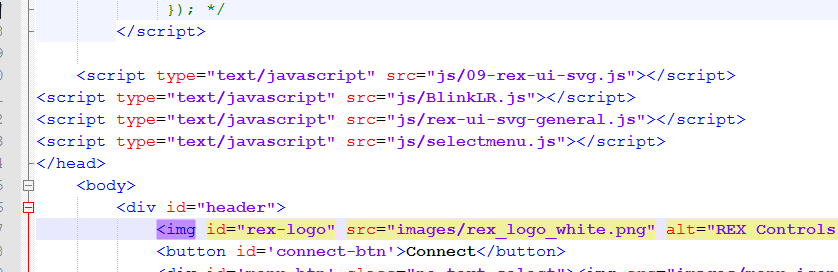
		<content type="html"><![CDATA[<p>The export works as it should, except the fact that your library is ignored for some reason. With empty Library Path, all libraries from C:\ProgramData\REX Controls\RexHMI\libs are exported:</p><div class="codebox"><pre><code>&lt;script type=&quot;text/javascript&quot; src=&quot;js/rex-ui-svg-general.js&quot;&gt;&lt;/script&gt;
&lt;script type=&quot;text/javascript&quot; src=&quot;js/rex-ui-svg-home.js&quot;&gt;&lt;/script&gt;
&lt;script type=&quot;text/javascript&quot; src=&quot;js/rex-ui-svg-hvac.js&quot;&gt;&lt;/script&gt;</code></pre></div><p>When libraries are listed in Library Path, only the selected ones are included:</p><div class="codebox"><pre><code>&lt;script type=&quot;text/javascript&quot; src=&quot;js/rex-ui-svg-general.js&quot;&gt;&lt;/script&gt;</code></pre></div><p>In both cases, the line with your library should be included:</p><div class="codebox"><pre><code>&lt;script type=&quot;text/javascript&quot; src=&quot;js/BlinkLR.js&quot;&gt;&lt;/script&gt;</code></pre></div><p>However, it is ignored for some unknown reason and I do want to find out why. Thanks for your cooperation so far.</p><ul><li><p>What Windows are you using?</p></li><li><p>What version of RexHMI extension are you using (Extensions-&gt;RexHMI-&gt;Version Info)?</p></li><li><p>Can you try running Inkscape as Administrator and do both exports once again?</p></li><li><p>Can you please zip the whole folder C:\ProgramData\REX Controls\RexHMI\libs as you have it at the moment and upload it here?</p></li></ul>]]></content>
		<author>
			<name><![CDATA[jaroslav_sobota]]></name>
			<uri>http://www.rexygen.com/oldforum/profile.php?id=3</uri>
		</author>
		<updated>2015-11-26T00:30:09Z</updated>
		<id>http://www.rexygen.com/oldforum/viewtopic.php?pid=110#p110</id>
	</entry>
	<entry>
		<title type="html"><![CDATA[Re: Creating a button in Inkscape]]></title>
		<link rel="alternate" href="http://www.rexygen.com/oldforum/viewtopic.php?pid=106#p106"/>
		<content type="html"><![CDATA[<p>I exported with the same settings as you described above but it looks like that the paths for the libraries are not exported. It&#039;s only when I leave the field empty that the index.html file contains the path to the libraries....</p><p><a href="http://www.rexygen.com/oldforum/img/members/6/test_with_lib_path.zip" rel="nofollow">exported HMI with path to libraries</a></p><p><a href="http://www.rexygen.com/oldforum/img/members/6/test_no_path.zip" rel="nofollow">exported HMI with empty field (no paths to libraries)</a></p>]]></content>
		<author>
			<name><![CDATA[scoobsalamander]]></name>
			<uri>http://www.rexygen.com/oldforum/profile.php?id=6</uri>
		</author>
		<updated>2015-11-25T10:46:08Z</updated>
		<id>http://www.rexygen.com/oldforum/viewtopic.php?pid=106#p106</id>
	</entry>
	<entry>
		<title type="html"><![CDATA[Re: Creating a button in Inkscape]]></title>
		<link rel="alternate" href="http://www.rexygen.com/oldforum/viewtopic.php?pid=104#p104"/>
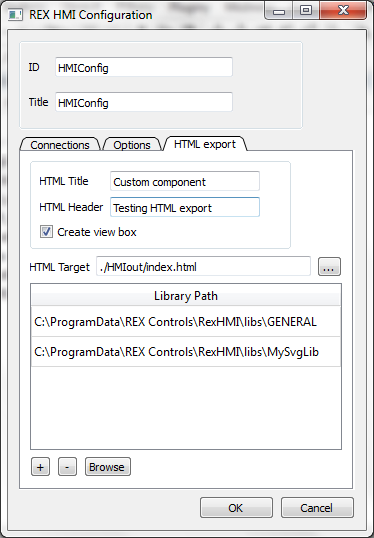
		<content type="html"><![CDATA[<p>I can confirm your component is perfectly valid. However, I&#039;m not able to replicate your bug...</p><p>Even if the generated index.html does not contain a link to the BlinkLR.js file, is the BlinkLR.js file included in the exported HMI/js folder?</p><p>Can you please try exporting the HMI with the following settings?<br /><span class="postimg"><img src="https://www.rexygen.com/oldforum/img/members/3/MySvgLib-export.png" alt="MySvgLib-export.png" /></span><br />With this settings, is the link to BlinkLR.js present in the index.html file? Can you please upload the whole exported HMI?</p><p>Thanks!</p><p>PS Your rectangular circles are beautiful <img src="http://www.rexygen.com/oldforum/img/smilies/wink.png" width="15" height="15" alt="wink" /></p>]]></content>
		<author>
			<name><![CDATA[jaroslav_sobota]]></name>
			<uri>http://www.rexygen.com/oldforum/profile.php?id=3</uri>
		</author>
		<updated>2015-11-24T22:29:47Z</updated>
		<id>http://www.rexygen.com/oldforum/viewtopic.php?pid=104#p104</id>
	</entry>
	<entry>
		<title type="html"><![CDATA[Re: Creating a button in Inkscape]]></title>
		<link rel="alternate" href="http://www.rexygen.com/oldforum/viewtopic.php?pid=103#p103"/>
		<content type="html"><![CDATA[<p>Everything is working fine, the only thing is that I have to include the library manually inside index.html</p>]]></content>
		<author>
			<name><![CDATA[scoobsalamander]]></name>
			<uri>http://www.rexygen.com/oldforum/profile.php?id=6</uri>
		</author>
		<updated>2015-11-24T19:33:55Z</updated>
		<id>http://www.rexygen.com/oldforum/viewtopic.php?pid=103#p103</id>
	</entry>
	<entry>
		<title type="html"><![CDATA[Re: Creating a button in Inkscape]]></title>
		<link rel="alternate" href="http://www.rexygen.com/oldforum/viewtopic.php?pid=102#p102"/>
		<content type="html"><![CDATA[<p><a href="http://www.rexygen.com/oldforum/img/members/6/BlinkLR.zip" rel="nofollow">BlinkLR.zip</a></p><p>(don&#039;t mind my circles, they look like rectangles..... <img src="http://www.rexygen.com/oldforum/img/smilies/smile.png" width="15" height="15" alt="smile" /> )</p>]]></content>
		<author>
			<name><![CDATA[scoobsalamander]]></name>
			<uri>http://www.rexygen.com/oldforum/profile.php?id=6</uri>
		</author>
		<updated>2015-11-24T19:20:56Z</updated>
		<id>http://www.rexygen.com/oldforum/viewtopic.php?pid=102#p102</id>
	</entry>
	<entry>
		<title type="html"><![CDATA[Re: Creating a button in Inkscape]]></title>
		<link rel="alternate" href="http://www.rexygen.com/oldforum/viewtopic.php?pid=101#p101"/>
		<content type="html"><![CDATA[<p>Please upload also your source SVG file if possible.</p>]]></content>
		<author>
			<name><![CDATA[jaroslav_sobota]]></name>
			<uri>http://www.rexygen.com/oldforum/profile.php?id=3</uri>
		</author>
		<updated>2015-11-24T18:02:06Z</updated>
		<id>http://www.rexygen.com/oldforum/viewtopic.php?pid=101#p101</id>
	</entry>
	<entry>
		<title type="html"><![CDATA[Re: Creating a button in Inkscape]]></title>
		<link rel="alternate" href="http://www.rexygen.com/oldforum/viewtopic.php?pid=100#p100"/>
		<content type="html"><![CDATA[<p>Yes, it&#039;s still empty.</p><p>(<a href="http://www.rexygen.com/oldforum/img/members/6/index.zip" rel="nofollow">my index.html file</a>)</p>]]></content>
		<author>
			<name><![CDATA[scoobsalamander]]></name>
			<uri>http://www.rexygen.com/oldforum/profile.php?id=6</uri>
		</author>
		<updated>2015-11-23T12:56:00Z</updated>
		<id>http://www.rexygen.com/oldforum/viewtopic.php?pid=100#p100</id>
	</entry>
	<entry>
		<title type="html"><![CDATA[Re: Creating a button in Inkscape]]></title>
		<link rel="alternate" href="http://www.rexygen.com/oldforum/viewtopic.php?pid=99#p99"/>
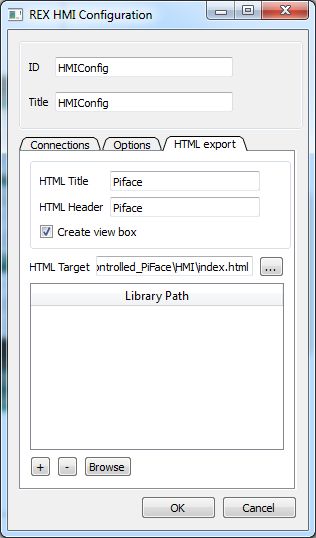
		<content type="html"><![CDATA[<p>Did you leave the Library Path field empty? <br /><span class="postimg"><img src="https://www.rexygen.com/oldforum/img/members/3/RexHMI-configuration.png" alt="RexHMI-configuration.png" /></span></p><p>If yes, all libraries from C:\ProgramData\REX Controls\RexHMI\libs should be added automatically...</p>]]></content>
		<author>
			<name><![CDATA[jaroslav_sobota]]></name>
			<uri>http://www.rexygen.com/oldforum/profile.php?id=3</uri>
		</author>
		<updated>2015-11-23T12:25:52Z</updated>
		<id>http://www.rexygen.com/oldforum/viewtopic.php?pid=99#p99</id>
	</entry>
	<entry>
		<title type="html"><![CDATA[Re: Creating a button in Inkscape]]></title>
		<link rel="alternate" href="http://www.rexygen.com/oldforum/viewtopic.php?pid=98#p98"/>
		<content type="html"><![CDATA[<p>That&#039;s what I did, but when exporting to html the reference to my own library is not automatically inserted into the index.html file.</p>]]></content>
		<author>
			<name><![CDATA[scoobsalamander]]></name>
			<uri>http://www.rexygen.com/oldforum/profile.php?id=6</uri>
		</author>
		<updated>2015-11-23T12:17:31Z</updated>
		<id>http://www.rexygen.com/oldforum/viewtopic.php?pid=98#p98</id>
	</entry>
</feed>